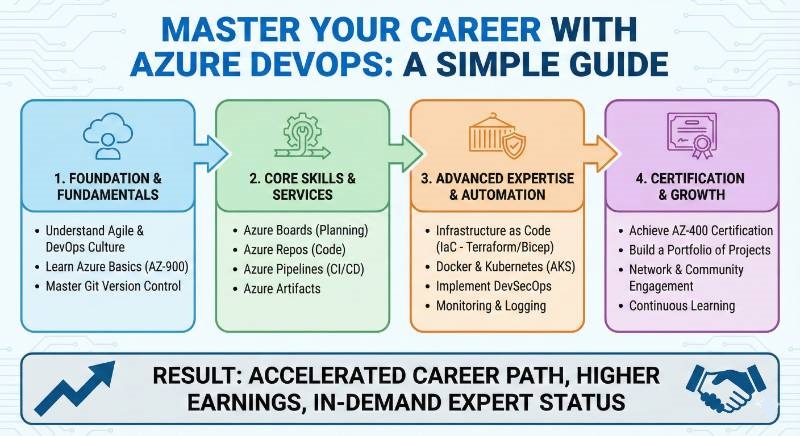
In the tech world, things move fast. We used to build software in big, slow chunks. Today, we do it in small, fast pieces. DevOps is the “secret sauce” that makes this possible. It’s simply a way for the people who write code (developers) and the people who run it (operations) to work as one team.
After years of watching systems succeed and fail, I can tell you this: Azure DevOps is one of the most powerful toolkits available. It doesn’t just help you automate tasks; it helps you build better software, faster, and with fewer headaches.
Whether you are an engineer in India looking for a global role or a manager trying to make your team more efficient, mastering Azure DevOps is the smartest career move you can make today. This guide will show you exactly how to get there.
Why Azure DevOps in the Modern Era?
Today, companies don’t just want speed; they want reliability, security, and low costs. This has given birth to specialized fields like SRE (keeping things running), DevSecOps (keeping things safe), and FinOps (keeping things on budget).
Azure DevOps is the bridge that connects all these areas. If you know how to use it, you become the “glue” that holds a modern engineering team together.
The Ultimate Certification: Master in Azure DevOps
The Master in Azure DevOps certification is a complete program. It proves you don’t just know how to click buttons, but you understand how to deliver value from start to finish.
What it is
It is a professional program that teaches you how to use Microsoft’s tools to automate software testing, building, and deployment.
Who should take it
- Software Engineers who want to move into high-paying DevOps roles.
- Systems Admins who want to learn modern cloud automation.
- Managers who need to understand how their team’s “engine” works.
Skills you’ll gain
- Continuous Integration (CI): Automatically testing code every time it’s changed.
- Continuous Delivery (CD): Shipping code to users safely and quickly.
- Infrastructure as Code (IaC): Setting up servers using code instead of manual clicks.
- Monitoring: Using data to see if your app is healthy or breaking.
Real-world projects you should be able to do
- Build a system that automatically updates an app without any “downtime” for users.
- Setup a “security gate” that stops bad code from being published.
- Create a “self-healing” system that fixes itself when a server crashes.
Preparation plan
- 30 Days: If you already use Azure daily. Spend 2 hours a day on “Pipelines” and “Repos.”
- 60 Days: If you are transitioning from a different field. Start with “Cloud Basics” first.
Common mistakes
- Skipping the Basics: Trying to build complex pipelines before understanding how Git works.
- Ignoring Security: Adding security at the very end instead of the beginning.
- Doing it Manually: If you have to do it twice, write a script for it!
Best next certification after this
The Certified DevSecOps Professional—because being the “security expert” on a DevOps team is a major career booster.
Azure DevOps Certification Landscape
| Track | Level | Who it’s for | Prerequisites | Skills Covered | Recommended Order |
| Full Stack DevOps | Master | Engineers & Managers | Basic Cloud Knowledge | CI/CD, IaC, SRE | 1st |
| Security | Advanced | Security Pros | DevOps Basics | Scanning, Compliance | 2nd |
| Data/AI | Expert | Data Engineers | Data Basics | Model Pipelines | 3rd |
Choose Your Path: 6 Simple Learning Paths
Don’t try to learn everything at once. Pick the path that matches your interest:
- DevOps: The “All-Rounder.” Focus on the flow of code from laptop to cloud.
- DevSecOps: The “Protector.” Focus on making sure every line of code is safe.
- SRE: The “Fixer.” Focus on making sure the website never goes down.
- AIOps/MLOps: The “Future.” Using DevOps to manage Artificial Intelligence models.
- DataOps: The “Librarian.” Using DevOps to manage massive amounts of data.
- FinOps: The “Accountant.” Making sure the cloud bill doesn’t get too expensive.
Role → Recommended Certifications
- DevOps Engineer: Master in Azure DevOps → Kubernetes Expert.
- SRE: Master in Azure DevOps → Azure Monitor Specialist.
- Platform Engineer: Master in Azure DevOps → Infrastructure Expert.
- Engineering Manager: Master in Azure DevOps → Agile Leadership.
Top Institutions for Training & Certification
If you want to learn correctly, these institutions offer excellent hands-on programs:
- DevOpsSchool:
Very popular for its practical approach. They focus on “learning by doing” with real projects. - Cotocus:
Great for corporate training. They teach you how big companies actually use these tools. - Scmgalaxy:
A huge community site with thousands of free tutorials and high-quality certification courses. - BestDevOps:
Offers focused bootcamps that help you get certified in a short amount of time. - devsecopsschool.com:
The best place to learn how to add security to your DevOps pipelines. - sreschool.com:
Dedicated to Site Reliability Engineering—perfect for those who love “Operations.” - aiopsschool.com:
Specialized in the intersection of AI and DevOps automation. - dataopsschool.com:
Focuses on how to handle “Big Data” pipelines using DevOps methods. - finopsschool.com:
Teaches you how to save your company money by managing cloud costs.
Next Certifications to Take
Where should you go after becoming a Master in Azure DevOps?
- Same Track: Azure Solutions Architect. Learn the “big picture” of how cloud systems are designed.
- Cross-Track: Certified DevSecOps Professional. This makes you much more valuable in the job market.
- Leadership: Technical Product Management. Great if you want to move into a high-level manager role.
FAQs: Master in Azure DevOps
1. Is this certification hard for a beginner?
It’s a challenge, but very doable if you follow a structured plan. It’s best to have a little bit of coding or IT experience first.
2. Will this help me get a higher salary?
Absolutely. DevOps is one of the top-paying sectors in IT right now, especially for those who can prove their skills with a “Master” certification.
3. How long does the training take?
Most people finish the core training in 4 to 6 weeks, depending on how much time they can spend each day.
4. Do I need to know how to code?
You don’t need to be a software developer, but you should be comfortable with basic scripting (like writing simple commands).
5. What is the difference between Azure DevOps and GitHub?
They are cousins! Azure DevOps is a full suite for big companies, while GitHub started for sharing code. Both are owned by Microsoft and work great together.
6. Can I take the exam online?
Yes, the certification and the training can usually be completed entirely online from anywhere in the world.
7. Why should I choose Azure over AWS or Google Cloud?
Azure is the choice for most large “Enterprise” companies. If you want to work for a big, stable corporation, Azure is a great bet.
8. What happens if I fail the first time?
Don’t worry! Most training providers allow you to retake the course or exam after a bit more practice.
Conclusion
The most successful engineers are those who master the “how” and the “why,” not just the “what.” Choosing to pursue a Master in Azure DevOps is more than just adding a line to your resume. It is a commitment to understanding the entire heartbeat of modern software delivery. Whether you are aiming to be a technical lead in a global firm or a manager streamlining a local startup, these skills are your currency.
The transition from “Engineer” to “Master” happens when you stop seeing tools as separate entities and start seeing them as a single, flowing pipeline that delivers value to real people. With the right training from the institutions we’ve discussed and a disciplined study plan, you aren’t just keeping up with the industry—you are leading it.
Leave a Reply